Angular, Spring Boot and OAuth2
Angular, Spring Boot, REST, Security and OAuth2 - Part 1 - How to protect your app
Project NewWebApp, requirements:
Architect : ‚We have to implement <u>REST</u> Services, everything should be <u>stateless</u> and the client is a <u>JS Framework</u>. All the last techs, isn’t it cool? And avoid cookies, they are not safe, they have a bad reputation and there are too many policies against them.‘
Business analyst: ‚There is a welcome page, the user has to <u>login </u>to access the <u>local secured resources.</u> I suggest to avoid cookies too, they are bad for the health and they can ruin our marketing campaign.’
You : ‚ No session?! Rest services?! No cookies?! How I verify the identity of the user? I have to request his identity at every request?‘
OAuth 2 can be a solution to your problem
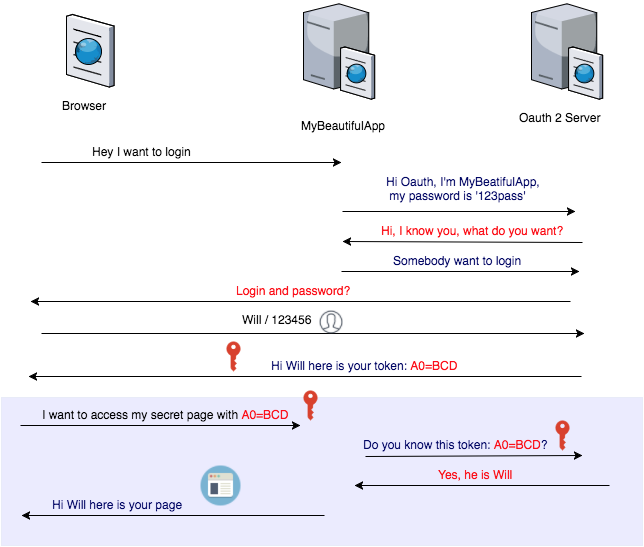
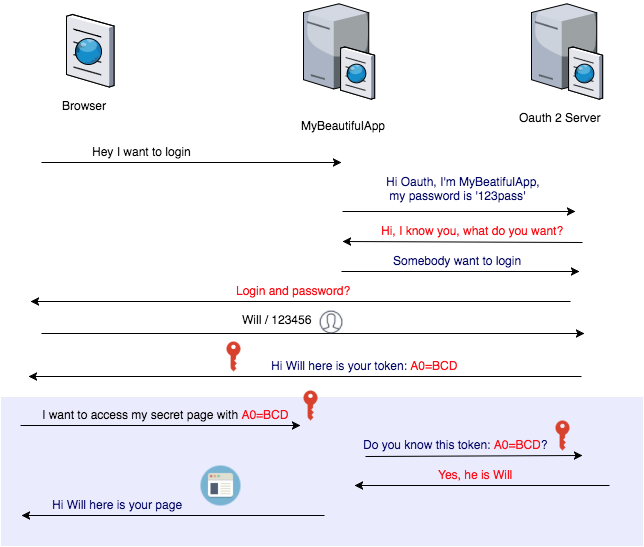
The client has to login with the Authorization Server, this can be connected to your LDAP in the company or with an external service like Google or Amazon. This server generate a Token that is stored by the javascript client. This token has to be sent in every request from the client to your Java application. Your application ask to the server if the token is valid, in case it is affirmative the user has the authorization.
Here described the communication:
Where to store the token?
The cookies are not safe and they can give a lot of troubles. One solution is to store the token in the <a href="https://developer.mozilla.org/en-US/docs/Web/API/Window/sessionStorage" rel=“nofollow" target="_blank">session storage</a> of the browser. In this case when the user will close the browser the session will be closed.
``` javascript
saveMyToken(accessTokenYouReceivedFromTheServer) { yourService.$window.sessionStorage.setItem('myToken', accessTokenYouReceivedFromTheServer) }
When you need it you can retrieve the token easily:

``` javascript

getMyStoredToken() {
yourService.$window.sessionStorage.getItem('myToken');
}
How to prepare a request with the token received from the server:
``` javascript sendRequestToTheBackend() { return this.$http(method:'GET', url:'https://yourBackend/restResourceURL', headers: this.getHeaders() })}
getHeaders() { return { 'Authorization': 'Bearer ' + this.getMyStoredToken, 'Accept': 'application/json', 'X-Requested-With': 'XMLHttpRequest' }