Performance improvement with Angular and Spring Boot
Better performance with smaller and faster Angular applications using Spring Boot and Tomcat
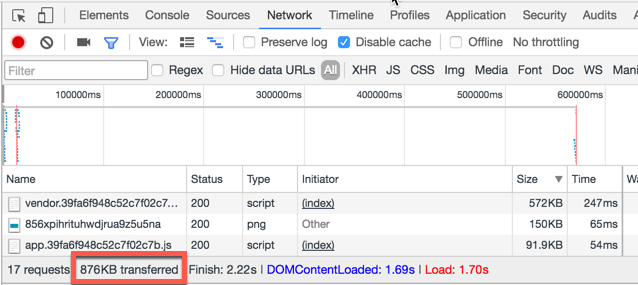
Problem: </strong>the size of our Angular application is too big and it takes too much time to download. How to reduce the size of the application?
Solution: one of the most common solutions is to use <a href="https://webpack.github.io">webpack</a> that optimise our code and reduce eliminates the useless libraries and empty spaces.
A second important help can come from our <strong>webserver</strong>, the browsers can open <strong>compressed files</strong> (<a href="https://en.wikipedia.org/wiki/HTTP_compression">HTTP compression</a>).
This could have a huge impact when our application is accessed by browser located in different continents with big latency.
Apache and Ngix allow easily to compress your static content and send it to the client browser if this is able to handle gzip files. How to do the same in <strong>Tomcat</strong>?
Tomcat allows to configure the compression through the server.xml file, e.g.:
We reduced the size of the application from 2.1 MB to 876 KB
``` xml
compression="on" compressionMinSize="2048" compressableMimeType= "text/html,text/xml,text/plain, text/css,text/javascript,text/json, application/x-javascript, application/javascript,application/json">
"ok but we are using Spring Boot with Tomcat Embedded ?"; no problem ;), here an example of implementation:
@Component public class TomcatCustomizer implements EmbeddedServletContainerCustomizer {
private static final String[] mimeTypes = {"text/html", "text/plain", "text/xml", "text/css", "text/javascript", "application/javascript"};
@Override public void customize(ConfigurableEmbeddedServletContainer configurableEmbeddedServletContainer) {
Compression compression = new Compression(); compression.setEnabled(true);
compression.setMimeTypes(mimeTypes); configurableEmbeddedServletContainer .setCompression(compression); } }