OCR Is Becoming Structured Data: Testing Mistral OCR 4 with Spring AI and Angular
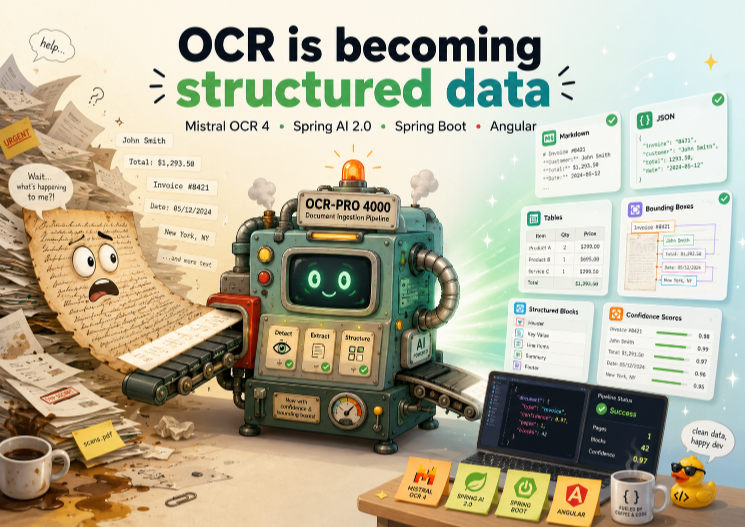
Modern OCR is no longer just about extracting text from PDFs.
The more interesting shift is that OCR can now return structured, reviewable, application-ready data: markdown, layout blocks, tables, images, bounding boxes, confidence signals, and JSON that can be consumed by another system.
That is what I wanted to test with Mistral OCR 4, Spring AI 2.0, Spring Boot, and Angular.
The result is Luce.Docu AI, a small full-stack demo for document ingestion workflows.
The application accepts a document, sends it through a Spring Boot backend, calls Mistral OCR 4, and renders the result in an Angular UI that feels more like a real application than a simple playground.
The main idea is simple:
OCR is becoming structured document intelligence.
Instead of stopping at plain text extraction, we can start building workflows where documents are parsed, reviewed, validated, transformed, and prepared for search, automation, or RAG.
You can find the code here: https://github.com/marco76/document-intelligence-spring-angular
Demo videos
I recorded two short demos for this post.
The first one shows the happy path with a clean document. The second one tests a more difficult case: a manuscript-style image.
The goal is not to run a scientific benchmark. The goal is to see how the OCR output feels inside a real application workflow: upload, extraction, review, JSON export, and inspection of structured blocks.
What the application does
The demo app is intentionally small, but it covers the full flow from frontend upload to backend extraction and result visualization.
The application can extract and display:
- Markdown per page
- Layout and content blocks
- Tables
- Extracted images
- Structured JSON
- Raw OCR response data for debugging
The frontend lets the user choose between three modes:
raw: mostly markdown outputfull: blocks, tables, headers, footers, and imagessmart: full extraction plus structured JSON annotations
This split is useful because it shows the progression from classic OCR to document intelligence.
Sometimes markdown is enough.
Sometimes you want layout-aware output.
Sometimes you want schema-driven JSON that another system can consume directly.
That is the part I find most interesting.
Next step would to use the data extracted and store it in a DB or send to an LLM for analysis.
Application flow
The application flow looks like this:
Angular frontend
  -> upload PDF or image
  -> POST /api/ocr

Spring Boot backend
  -> convert file to Base64 data URL
  -> call Mistral OCR 4
  -> normalize response

Angular result view
  -> summary
  -> markdown
  -> tables
  -> images
  -> blocks
  -> JSON
  -> raw response
The Angular application does not call Mistral directly.
The API key stays on the backend, and the frontend only talks to my own Spring Boot REST API. This is the same pattern I would use in a production application.
The frontend owns the user experience.
The backend owns the integration, security boundary, validation, and response normalization. The backend can open integration possibilities through the API.
Architecture overview
The repository has two clear parts:
frontend/: Angular 22 UI with drag-and-drop upload, PDF preview, result tabs, and search/filtering for extracted blocksbackend/: Spring Boot 4.x backend with Spring AI 2.0 and a directRestClientintegration for OCR 4-specific parameters
There are also two backend OCR paths:
SpringAiOcrClientMistralAdvancedOcrClient
The first one demonstrates the official low-level Spring AI MistralOcrApi.
The second one is the path used by the Angular UI, because OCR 4 exposes newer request options that are easier to pass through a direct HTTP request.
That is an important design decision.
I wanted to show both:
- how far the official Spring AI wrapper already gets you
- how to keep moving when a model adds request fields faster than a framework abstraction
This is a common situation when building applications. The framework gives you a clean starting point, but sometimes you still need to drop one level lower to access newer provider-specific options.
I do not see those two approaches as competing. In practice, I often want both in the same codebase.
In this case Spring AI 2.0 don't implement all the new features of Mistral OCR 4 (Document Blocks) and I had to use the more low level RestClient.
Why Mistral OCR 4 instead of basic OCR?
Traditional OCR is often treated as a simple text extraction step.
You upload a PDF or image.
You get text back.
You store it somewhere.
That is useful, but it is not enough for many real document workflows.
In this demo, I wanted to test the features that make OCR output more application-friendly:
include_blocksfor structural blocks- bounding boxes for visual grounding
- confidence scores for review workflows
- image extraction for richer documents
- schema-based document annotations for structured JSON
That changes the shape of the workflow:
Document
  -> OCR
  -> structured output
  -> validation / review
  -> storage, search, automation, or RAG
Once OCR returns more than text, the application can reason about titles, tables, headers, footers, signatures, or uncertain regions instead of treating the whole document as one flat string.
This is where OCR starts to feel less like a utility and more like an ingestion layer for document intelligence.
Spring Boot backend setup
The backend is intentionally small.
It uses:
- Spring Boot
spring-boot-starter-web- validation support
- Spring AI 2.0
- Mistral integration
RestClientfor the advanced OCR 4 request
Configuration is kept in application.yml, with the model defaulting to:
mistral-ocr-4-0
The main endpoint is a multipart upload endpoint:
POST /api/ocr
The controller accepts:
filemodepagesincludeImageBase64languagecustomPrompt
The uploaded file is converted into a Base64 data URL before it is sent to Mistral.
That keeps the frontend simple and ensures the API key stays on the server side, where it belongs.
There is also a URL-based endpoint:
POST /api/ocr/url
That endpoint is useful for quick cURL demos, testing public PDFs, and creating screenshots for the blog post.
Adding Spring AI 2.0 and the Mistral dependency
The backend uses Spring AI 2.0 through the Spring AI BOM and the spring-ai-mistral-ai dependency:
<dependencyManagement>
  <dependencies>
    <dependency>
      <groupId>org.springframework.ai</groupId>
      <artifactId>spring-ai-bom</artifactId>
      <version>2.0.0</version>
      <type>pom</type>
      <scope>import</scope>
    </dependency>
  </dependencies>
</dependencyManagement>

<dependency>
  <groupId>org.springframework.ai</groupId>
  <artifactId>spring-ai-mistral-ai</artifactId>
</dependency>
This is where Spring AI is useful for Java developers.
Even when the use case is specialized, like OCR, the application still stays in familiar Spring Boot territory:
- configuration properties
- controllers
- validation
- typed request and response objects
- logging
- error handling
- HTTP clients
- security boundaries
That matters because most real AI applications are not isolated scripts. They are backend systems that need to integrate with existing services, frontend applications, databases, queues, logs, and monitoring.
Calling the official Spring AI MistralOcrApi
One backend path is there specifically to demonstrate the official Spring AI OCR wrapper.
The SpringAiOcrClient builds a MistralOcrApi.OCRRequest, chooses DocumentURLChunk or ImageURLChunk, and calls the low-level API client directly.
That version is exposed through:
POST /api/ocr/spring-ai/url
I like keeping this path in the project because it shows the cleanest starting point for Java developers who want to try OCR with Spring AI before adding custom request handling.
It also shows a realistic development pattern:
Start with the framework abstraction, then drop down one level when you need provider-specific features.
That pattern is especially useful in AI development because provider APIs evolve quickly.
A framework abstraction can simplify the common path, but the newest model options are not always available immediately through the higher-level API.
Adding OCR 4 options with RestClient
The Angular UI uses the MistralAdvancedOcrClient.
This client sends a direct request to /v1/ocr with a richer request body.
The request includes fields like:
{
  "model": "mistral-ocr-4-0",
  "include_blocks": true,
  "include_image_base64": true,
  "extract_header": true,
  "extract_footer": true,
  "table_format": "html",
  "confidence_scores_granularity": "page"
}
In smart mode, the backend also sends:
document_annotation_promptdocument_annotation_format
The second field contains a JSON schema that asks for values such as:
summarydocument_typetitlelanguageentitiesdatesamountsline_itemskey_value_pairstables_summaryaction_itemsconfidence_notesresources
This is the most interesting part of the demo for me.
OCR is not the end of the pipeline anymore. OCR becomes the first step in producing structured business data.
Instead of only asking:
What text is inside this document?
we can start asking:
What kind of document is this?
What are the important entities?
Are there dates, amounts, resources, or action items?
Which parts should be reviewed by a human?
Can another system consume the result directly?
That is a much more powerful workflow.
Angular drag-and-drop upload UI
The frontend is built with Angular 22 and has a polished upload flow instead of a bare form.
For a document intelligence UI, the user experience is important. The user should be able to inspect the document, review the output, compare different views, and understand where the extracted data came from. These features have been added to the demo.
Rendering markdown, tables, images, blocks, and JSON
Once the backend returns the OCR response, the Angular app splits it into several views:
summarymarkdowntablesimagesblocksjsonraw
This structure makes the output much easier to inspect.
Markdown is useful for quick reading.
Tables are useful for structured visual data.
Images are useful for richer documents.
Blocks are useful for layout-aware inspection.
JSON is useful for downstream processing.
Raw output is useful when debugging the exact OCR response shape.
The app also computes simple stats such as page count, image count, block count, and active mode.
For blocks, it supports search and type filtering, which is especially helpful when testing longer documents.
Another useful detail is the preview-to-block relationship.
Mistral OCR returns the position of the text blocks, in the UI we can highlight them in the preview. That is what the user should expect from a modern OCR:
not just “what was extracted”, but “where did it come from?”
That connection is important for review workflows, redaction, auditing, citations, and human validation.
Clean document vs manuscript image
I tested two types of input.
The first one is a clean document. This is the happy path and a good way to verify that the application flow works end to end.
The second one is a manuscript style image. This is a more interesting case because the layout is less predictable and the extraction is naturally harder.
This kind of test is useful because it shows why structure and confidence matter.
Limitations of this demo
This project is not a benchmark.
I tested a few representative documents to understand the developer workflow and the shape of the OCR response, but I did not run a large evaluation across many document types.
There are also a few important points to keep in mind:
- Confidence scores are useful signals, but they are not a guarantee that the extracted content is correct.
- Structured JSON should still be validated before it is used in a business workflow.
- Sensitive documents require careful handling of privacy, retention, and compliance. Mistral offers a self-hosted option.
- For production use, I would add persistence, audit logs, retry handling, rate-limit handling, and human review for low-confidence fields.
The value of the demo is that it shows how OCR can become the first step in a safer document ingestion pipeline.
Possible real-world use cases
This kind of workflow can be used in many applications:
- Document ingestion
- Enterprise search
- RAG pipelines
- Contract review
- Invoice extraction
- Receipt processing
- Product sheet ingestion
- Research paper analysis
- Old letter archiving
- Compliance workflows
- Human-in-the-loop validation
The common idea is the same:
Raw document
  -> structured extraction
  -> review
  -> validated data
  -> downstream system
That downstream system could be a database, a search engine, a vector index, a workflow engine, or another backend service.
This is why I think OCR is becoming more interesting for application developers.
It is no longer only about converting scanned pages into text. It is becoming part of the data ingestion layer.
Final thoughts
This demo started as a small experiment, but it confirmed a bigger idea:
OCR is becoming structured data.
Plain text extraction is still useful, but it is not the full story anymore.
The real value comes when OCR can return structure, location, confidence, and data that applications can process.
With Mistral OCR 4, Spring AI 2.0, Spring Boot, and Angular, we can build workflows where documents are not just uploaded and stored. They can be understood, transformed, reviewed, indexed, and connected to other systems.