Spring Boot and JPA good practices and pitfalls

These are a few of the best practices we have collected across our Spring / JPA (Hibernate) projects. Every project and team has its own guidelines, and there are countless best practices out there. However, the ones mentioned here are less common and often overlooked.
I use these basic rules in the Spring-Angular template project, which you can find here:
https://github.com/marco76/spring-angular-template
Websites to monitor
https://spring.io/projects#release-calendar
During the project I regularly verify the Spring release calendar.
Usually there is a monthly release, if you are using the OSS version. It's worth to know what is coming and what will probably break with the new release.
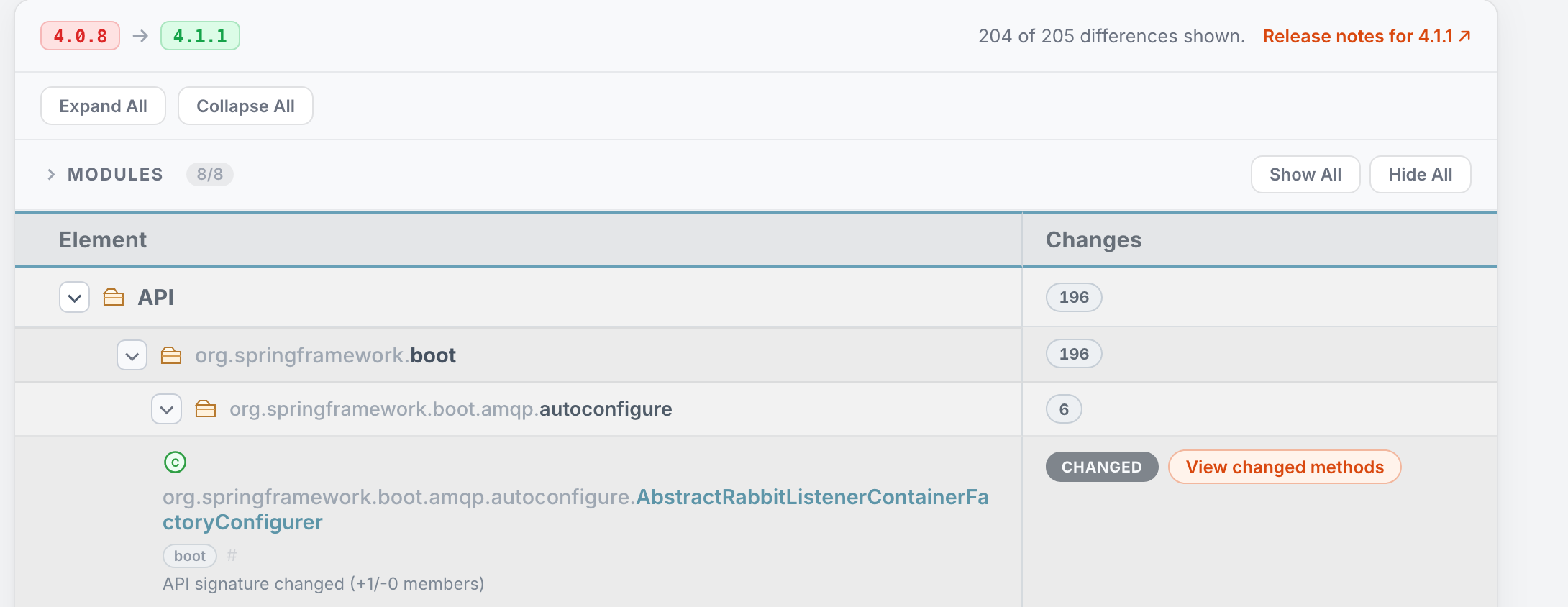
https://springdiff.marmo.dev
To simplify the comparison between versions i created (mostly vibed) a tool that shows the release notes and calculates the diff between different Spring Boot releases. The idea comes from JavaAlmanac.
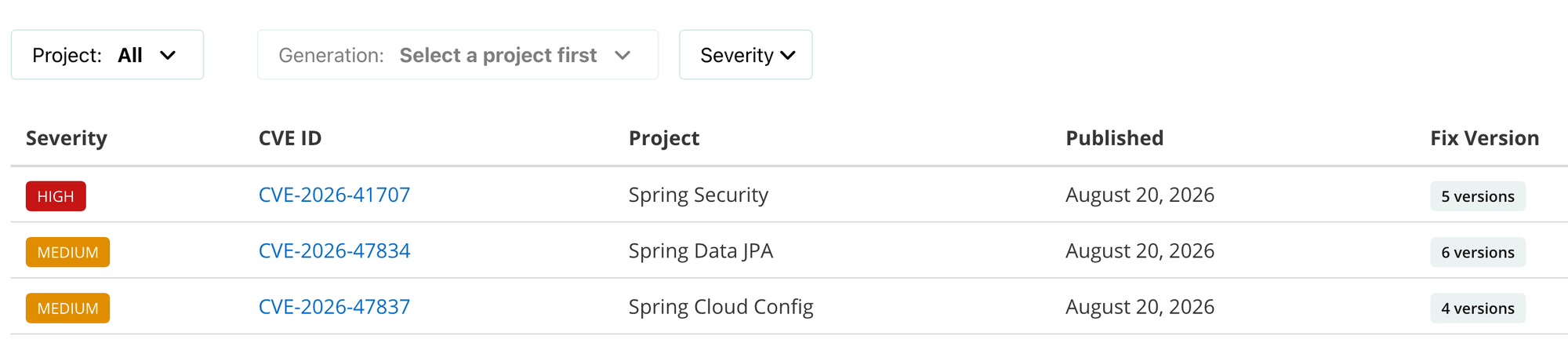
https://spring.io/security
Spring security has been created in September 2026. This page gives you an overview of the CREs (vulnerabilities) that the release of Spring solves. This is critical since the recent AcceleratIon of vulnerabilities found in existing software.
Spring Boot Tools (Official)
Spring Boot Dev Tools
https://docs.spring.io/spring-boot/reference/using/devtools.html
<dependencies>
  <dependency>
	<groupId>org.springframework.boot</groupId>
	<artifactId>spring-boot-devtools</artifactId>
	<optional>true</optional>
  </dependency>
</dependencies>
With this simple import, you add some magic like the automatic restart during development. If your project is not a mountain of slow code, this can accelerate the development. Check this or other features (e.g. caching) can help your development.
Spring Boot Tools
This is a set of tools is for your IDE (VS Code, Eclipse, Claude etc.). It allows you to better navigate and debug your Spring Code. There is no IntelliJ version because JetBrains developed its own tools.


Spring Boot Tools plugin for Claude
With this plugin Claude becomes aware of Spring Boot and you can ask question about your project, validate the code etc.
 spring-projects
Architecture and transaction boundaries
Disable Open Session in View: spring.jpa.open-in-view=false
By default, Spring Boot registers an OpenEntityManagerInViewInterceptor (spring.jpa.open-in-view=true).
With this option, Spring Boot binds a JPA EntityManager to the thread for the entire processing of the request.
This practice was useful in the past (using JSP and other view renderers) to avoid the LazyInitializationException when some entities were retrieved in a transaction and, in subsequent code, the application tried to access some lazy loaded entities linked to the result.
At this point the transaction was already closed and the entities detached.
For most applications this feature is not necessary anymore, some developers wanted to disable it by default in Spring Boot 2 already.
This triggered a debate between 'java gurus' regarding the utility and the performance impact of this binding.
I recommend starting a project setting
# Disable OSIV to prevent connection holding and N+1 issues
spring.jpa.open-in-view=false
and activate it only if really necessary. For REST applications with a transaction managed at service level, this interceptor should not be necessary.
De-activating open-in-view will avoid to bind an entity manager to the thread at every request and unbind it at the end of the request. The code concerned is in the org.springframework.orm.jpa.support.OpenEntityManagerInViewInterceptorclass.
Risks of keeping open-in-view enabled:
- Cause accidental N+1 queries in controllers
- Hide missing transactional boundaries
- Make performance debugging harder
Understand proxies and transactional behavior
Spring uses proxies and this is critical for features like @Transactional and other annotated methods.
Important implications:
- Self-invocation does not trigger transactional or enriched behaviors. When you call a method annotated with Spring, the call must come from outside the bean. A call from inside the class (e.g.
this.otherMethod) skips the proxy. finalmethods cannot be proxied (with CGLIB that creates subclasses)- Multiple internal calls to
@Transactionalmethods won’t start new transactions
Understanding how proxies work prevents subtle production bugs.
Use Interfaces when is appropriate to avoid CGLIB
Interfaces allow clean code debugging and a faster and smaller deployment. Here you can find more details: https://marmo.dev/spring-interfaces-cglib
Benefits:
- Simpler debugging
- Fewer proxy limitations
- Cleaner separation of responsibilities
- Better integration with AOT compilation and native deployment
It’s not mandatory — but in layered architectures, it improves clarity. In many projects we had big debates about interfaces, the team should decide the best approach for the project. Another big advantage is that if simplifies the AOT compilation and reduce the issues to deploy your solution to a native platform like GraalVM.
I personally prefer to avoid interfaces for single implementations, I find that they break the flow when I have to read the code, but I recognize the technical advantages for critical and complex projects.
Configuration & Dependency Injection
Use Constructor Injection
- the beans cannot be null;
- the object is immutable;
- the object can be defined final;
- in case the bean has only one constructor you can omit @Autowired, Spring will do the injection without annotations;
- forces better design decisions and discourages oversized service classes.
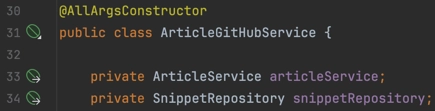
If there are multiple constructors I prefer to use these lombok features: @AllArgsConstructor or @RequiredArgsConstructor and simply declare your components as final fields (this is my favorite approach).
Lombok will create the constructor that will be used by Spring to inject the components.
Avoid Field Injection (@Autowired)
- Hides dependencies
- Complicates testing
- Breaks immutability
- Encourages oversized classes
In unit tests field injection can be practical and justified.
Prefer @ConfigurationProperties Over @Value
Spring Boot introduced the @ConfigurationProperties annotation that is far more superior than the basic @Value approach according to Stéphane Nicoll (Spring Team).
The advantages:
- You inject only an object a POJO and not a list of fields
- There is less risk to do typos in the declaration of the property
- The POJO is TypeSafe and can contain complex structures (e.g.
database.configuration.mysql.connection) - Adding Bean Validation (
spring-boot-starter-validation) you can use@Validatedon your config properties.
Here you can find the documentation:
- Spring Boot: Type-safe Configuration Properties
Instead of @Value("${app.timeout}") use @ConfigurationProperties(prefix = "app")
Always Explicitly Name Parameters for @RequestParam, @PathVariable and @Param
When working with Spring MVC and Spring Data JPA, it's a best practice to explicitly declare the names of your parameters in annotations like @RequestParam, @PathVariable, and @Param.
Spring MVC Example
@GetMapping("/users")
public String getUserById(@RequestParam("id") String userId) {
    return "User ID: " + userId;
}
By specifying the parameter name ("id"), you're making the binding explicit. This ensures Spring correctly maps the request parameter to your method argument—regardless of how the code is compiled or whether the -parameters flag is used.
If you omit the name, Spring will attempt to infer it from the method signature, which only works if your code is compiled with -parameters.
While enabling -parameters allows Spring to infer names via reflection, it’s still safer and clearer to be explicit—especially in larger or collaborative codebases.
To enable '-parameters' in Maven:
<compilerArgs>
    <arg>-parameters</arg>
</compilerArgs>
Spring Data JPA Example
Not good (positional binding):
@Query("SELECT u FROM User u WHERE u.username = ?1 AND u.code = ?2")
List<User> findByUsernameAndCode(String username, String code);
Better (explicit named binding):
@Query("SELECT u FROM User u WHERE u.username = :username AND u.code = :code")
List<User> findByUsernameAndCode(@Param("username") String username, @Param("code") String code);
Using @Param with named placeholders makes it obvious which method argument maps to which part.
What is -parameters?
Java, by default, strips method parameter names during compilation unless you explicitly tell it not to.
public void greet(String name) { ... }Without -parameters, reflection sees:
greet(java.lang.String arg0)With -parameters, it sees:
greet(java.lang.String name)This matters because Spring MVC and Spring Data JPA use reflection to map method parameters to inputs from HTTP requests or database queries.
Performance and scalability
Virtual Threads
If you are using Java 21 or later and Spring 3.2 you can activate Virtual Threads in Spring using: spring.threads.virtual.enabled=true
Spring will:
- configure Tomcat/Jetty to use virtual threads
- configure
@Asyncto use a virtual thread executor
If your application has a lot of web requests or is using @Async methods you could see an improvement in the performances.
Traditionally, each web request opens a new thread at OS level; this operation is expensive. With virtual threads the Java Runtime will create a light thread with improved utilization of the resources.
Virtual threads reduce the need to switch to a reactive stack (and co-routines in Kotlin) for many I/O-bound applications.
Server compression
This feature can be useful if your deployment doesn't use a proxy (e.g. nginx), we can ask Spring to compress the static assets and reduce the size of the files sent to the client. Compression improves bandwidth usage but increases CPU usage — always measure under load.
# Enable response compression
server.compression.enabled=true
# Mime types that should be compressed
server.compression.mime-types=text/html,text/xml,text/plain,text/css,text/javascript,application/javascript,application/json
# Only compress responses larger than 8KB
server.compression.min-response-size=8192
# Caching for static resources
spring.web.resources.cache.cachecontrol.max-age=15768000
This works with embedded Tomcat, Jetty, or Undertow.
The best solution is still to use a dedicated proxy server (nginx, apache) or cloud providers (CloudFront, Cloudflare) with caching features. You can find an example in my post: Docker with Angular and Nginx
Cache
Check if your view template engine supports caching in Spring and use it in case of benefits. Example, this blog mustache and the caching has to be activated: spring.mustache.servlet.cache=true
Monitor slow queries
You can easily log slow queries with Spring adding a threshold in the configuration. This is particularly useful if you have limited tools for observality.
// define the millisecons that will triggert the log
spring.jpa.properties.hibernate.session.events.log.LOGQUERIESSLOWERTHANMS=300
logging.level.org.hibernate.SQL_SLOW=INFO
Avoid NullPointerException using JSpecify
Spring 7 and Spring Boot 4 migrated their code and now use JSpecify.
This is considered the new 'standard' for code static analysis in particular for the management of the null parameters in Java. If you were jealous about your friend that uses Kotlin and has not nullby default, you can do the same in your Spring application.
You can find more here: https://www.marmo.dev/spring-boot-4-null-safety/
Spring Boot has its own favorite dependencies, don't fight with them
Often in maven is not required to specify a version for the library that you want to import. If you don't need a specific version (e.g. incompatibility) you can simply let the Spring team choose for you. These releases should not be in conflict between each other and are used by the Spring team. You can check the versions here: https://docs.spring.io/spring-boot/appendix/dependency-versions/coordinates.html
You can check what you have in your final deliverable with: ./mvnw dependency:tree
Hibernate
Use typesafe Specifications
If you are using Spring Specification (Criteria) for your query you can have a better experience using JPA Model Gen from hibernate. It scans your entities and it generates meta-classes that can be used in the Criteria Queries.
<dependency>
    <groupId>org.hibernate.orm</groupId>
    <artifactId>hibernate-jpamodelgen</artifactId>
    <version>${hibernate.version}</version>
    <scope>provided</scope>
</dependency>
E.g. for the Entity User it will generate User_
public class UserSpecs {
    public static Specification<User> hasEmail(String email) {
        return (root, query, cb) -> cb.equal(root.get(User_.email), email);
    }
}
instead of something like
root.get("email")Don't use eager to avoid n+1
This one can be surprising, but I had meetings to clarify this. Some developers thought that using and eager relationship was a good solution to avoid the n+1 issue in hibernate due to lazy loading.
 Marco Molteni
Well, no, it simply load a lot of not necessary data in the memory (maybe the full DB). To avoid n+1 is recommended to use join fetch in JPL or @EntityGraph in Spring Data.
Hibernate 7.4 can help with the new pagination that solves other issues linked to join fetch https://www.marmo.dev/hibernate-7-4/#4-safer-pagination-with-collection-join-fetch