Spring Boot: REST controller Test example
updated 02.2022
In my Spring Boot - Angular showcase you can find some examples of REST controller tests.
The @RestController used for the example is the following:
``` java @RestController // we allow cors requests from our frontend environment // note the curly braces that create an array of strings ... required by the annotation @CrossOrigin(origins = {"${app.dev.frontend.local"}) public class HelloController {
// simple GET response for our example purpose, we return a JSON structure @RequestMapping(value = "/message", produces = MediaType.APPLICATIONJSONVALUE) public Map<String, String> index() { return Collections.singletonMap("message", "Greetings from Spring Boot!"); } }
## Test the controller using an embedded server (integration tests)

With this approach, Spring starts an embedded server to test your REST service.

To create these tests you have to add a dependency to :

``` xml
<dependency>
  <groupId>org.springframework.boot</groupId>
  <artifactId>spring-boot-starter-test</artifactId>
</dependency>
In your test, you have to define a webEnvironment, in our case we create an environment with a random port number.
Defining the webEnvironment we can wire the TestRestTemplate that allows us to execute REST requests. TestRestTemplate is fault-tolerant and can be used with Basic authentication headers. It doesn't extend RestTemplateif you encounter issues during r tests you should maybe try RestTemplate.
/**
 * The goal of this class is to show how the Embedded Server is used to test the REST service
 */

// SpringBootTest launch an instance of our application for tests purposes
@SpringBootTest(webEnvironment = SpringBootTest.WebEnvironment.RANDOM_PORT)
class HelloControllerEmbeddedServerTest {
  @Autowired
  private HelloController helloController;

  // inject the runtime port, it requires the webEnvironment
  @LocalServerPort
  private int port;

  // we use TestRestTemplate, it's an alternative to RestTemplate specific for tests
  // to use this template a webEnvironment is mandatory
  @Autowired
  private TestRestTemplate restTemplate;

  @Test
  void index() {
    // we test that our controller is not null
    Assertions.assertThat(helloController).isNotNull();
  }

  @Test
  void indexResultTest() {
    Assertions.assertThat(restTemplate
      .getForObject("http://localhost:" + port + "/message", String.class)).contains("from Spring Boot");
  }
}
When you run the test you can notice in your console that Spring Boot runs a Tomcat Server.
``` bash INFO 4230 --- [main] o.s.b.w.embedded.tomcat.TomcatWebServer : Tomcat initialized with port(s): 0 (http) INFO 4230 --- [main] o.apache.catalina.core.StandardService : Starting service [Tomcat] INFO 4230 --- [main] org.apache.catalina.core.StandardEngine : Starting Servlet engine: [Apache Tomcat/9.0.43] INFO 4230 --- [main] o.a.c.c.C.[Tomcat].[localhost].[/] : Initializing Spring embedded WebApplicationContext INFO 4230 --- [main] w.s.c.ServletWebServerApplicationContext : Root WebApplicationContext: initialization completed in 1761 ms
If you are trying to test GET methods with payload, this method could give you headaches.

`RestTemplateTest` doesn't like to add payloads to the GET request and you will receive an error response, you can read more in my post about the [Spring Boot GET Test limitation](https://marmo.dev/spring-boot-test-get-body).

## MockMvc, testing without an embedded server

The previous controller could be tested with `@MockMvc`, this allows us to have tested the `RestController` without the overhead of a server (pushing us in the integration tests domain).

``` java
/**
 * The goal of this class is to test the controller using a MockMvc object without an embedded server
 */
@SpringBootTest
@AutoConfigureMockMvc // we mock the http request and we don't need a server
public class HelloControllerMockMvcTest {

    @Autowired
    private MockMvc mockMvc; // injected with @AutoConfigureMockMvc

    @Test
    public void shouldReturnOurText() throws Exception {
        this.mockMvc
                .perform(get("/message")) // perform a request that can be chained
                .andDo(print()) // we log the result
                .andExpect(content().string(containsString(" from Spring"))); // we check that the Body of the answer contains our expectation
    }
}
In this case Spring initializes a test Servlet without embedding a full server, from the console:
``` bash INFO 4589 --- [main] o.s.s.concurrent.ThreadPoolTaskExecutor : Initializing ExecutorService 'applicationTaskExecutor' INFO 4589 --- [main] o.s.b.a.w.s.WelcomePageHandlerMapping : Adding welcome page: class path resource [static/index.html] INFO 4589 --- [main] o.s.b.t.m.w.SpringBootMockServletContext : Initializing Spring TestDispatcherServlet '' INFO 4589 --- [main] o.s.t.web.servlet.TestDispatcherServlet : Initializing Servlet '' INFO 4589 --- [main] o.s.t.web.servlet.TestDispatcherServlet : Completed initialization in 0 ms
With the `.andDo(print())` instruction many details are printed in the console (extract):
``` bash
...
ModelAndView:
        View name = null
             View = null
            Model = null

FlashMap:
       Attributes = null

MockHttpServletResponse:
           Status = 200
    Error message = null
          Headers = [Vary:"Origin", "Access-Control-Request-Method", "Access-Control-Request-Headers", Content-Type:"application/json"]
     Content type = application/json
             Body = {"message":"Greetings from Spring Boot!"}
...
(Old) Deep dive: @WebMvcTest, how it works
The annotation @WebMvcTest configure only the components that usually interest the web development.
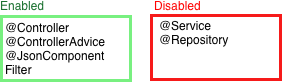
As shown in the image @Service and @Repositoryare not configured.
When we call the @Service from the @Controller we return the mocked object.
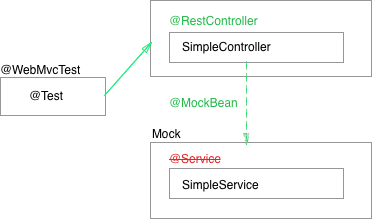
Controller example
This is a very simple controller that calls a service and returns a custom object containing a text value:
``` java
@RestController public class SimpleController {
private SimpleService simpleService;
public SimpleController(SimpleService simpleService) { this.simpleService = simpleService; }
@GetMapping(value = "/simple",produces = MediaType.APPLICATIONJSONVALUE) public ResponseEntity<StringJsonObject> simpleResult() { return ResponseEntity.ok(simpleService.getText()); } }
Here the service code:

``` java

@Service
public class SimpleServiceImpl implements SimpleService{
    @Override
    public StringJsonObject getText(){
        return new StringJsonObject("Cool!");
    }
}
The returned object:
``` java public class StringJsonObject {
private String content;
public StringJsonObject(String content) { this.content = content; }
public String getContent() { return content; } }
## The test with comments

Here the code used to test the controller:

``` java

// SpringRunner is an alias of SpringJUnit4ClassRunner
// it's a Spring extension of JUnit that handles the TestContext
@RunWith(SpringRunner.class)

// we test only the SimpleController
@WebMvcTest(SimpleController.class)

public class SimpleControllerTest {

    // we inject the server side Spring MVC test support
    @Autowired
    private MockMvc mockMvc;

    // we mock the service, here we test only the controller
    // @MockBean is a Spring annotation that depends on mockito framework
    @MockBean
    private SimpleService simpleServiceMocked;

    @Test
    public void simpleResult() throws Exception {

        // this is the expected JSON answer
        String responseBody = "{\"content\":\"Hello World from Spring!\"}";

        // we set the result of the mocked service
        given(simpleServiceMocked.getText())
                .willReturn(new StringJsonObject("Hello World from Spring!"));

        // the test is executed:
        // perform: it executes the request and returns a ResultActions object
        // accept: type of media accepted as response
        // andExpect: ResultMatcher object that defines some expectations
        this.mockMvc.perform(get("/simple")
                .accept(MediaType.APPLICATION_JSON))
                .andExpect(status().isOk())
                .andExpect(content().string(responseBody));
    }
}