Angular, Spring Boot, Kubernetes and CORS: Why we Don’t Need CORS in Production

Developers usually discover CORS after they deploy for the first time the application. Backend APIs were working correctly using curl (or a different Client tool), the frontend application was showing correctly the data (from the mockup data). When the developer deploys the full application on the laptop or on a server ... surprise, the browser shows an error.
A typical error looks something like this:
Access to XMLHttpRequest at 'https://marmofin.ch/api/...'
from origin 'http://localhost:4200'
has been blocked by CORS policy
The developer quickly discover that server:4200 and server:8080 are 2 different origins and the browser blocks the request. The lazy and dangerous solution was to add some configuration to Spring Boot (typically allowing access to everyone: '*').
In a professional application, a more strict configuration is needed, allowing only access to pre-defined origins ... or maybe not!
Do we need CORS in production?
The answer is: no. Not always.
For production environments my Angular (or React) application and Spring Boot API are exposed through the same origin.
CORS becomes relevant when the frontend runs on a different origin, for example when Angular runs locally and calls a deployed environment.
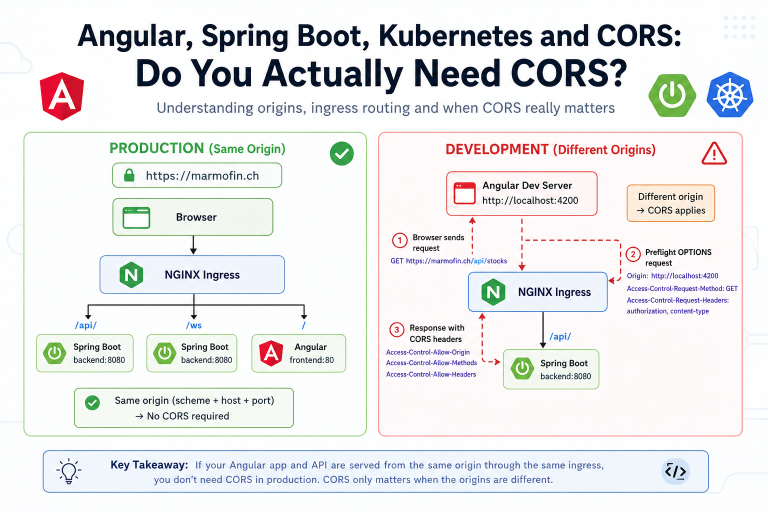
The application architecture
My application consists of:
- an Angular/React frontend
- a Spring Boot backend
- Kubernetes
- NGINX Ingress
- TLS termination at the ingress
The Kubernetes ingress looks like this:
apiVersion: networking.k8s.io/v1
kind: Ingress

metadata:
  name: stockdb-ingress
  namespace: stockdb-dev

  labels:
    app: stockdb

  annotations:
    nginx.ingress.kubernetes.io/proxy-read-timeout: "3600"
    nginx.ingress.kubernetes.io/proxy-send-timeout: "3600"

spec:
  ingressClassName: nginx

  rules:
    - host: marmofin.ch

      http:
        paths:
          - path: /api/
            pathType: Prefix
            backend:
              service:
                name: backend
                port:
                  number: 8080

          - path: /ws
            pathType: Prefix
            backend:
              service:
                name: backend
                port:
                  number: 8080

          - path: /
            pathType: Prefix
            backend:
              service:
                name: frontend
                port:
                  number: 80

  tls:
    - hosts:
        - marmofin.ch
      secretName: marmofin-tls
The trick here is to use NGINX:
ingressClassName: nginx
This is a normal Kubernetes Ingress handled by an NGINX Ingress Controller.
It is not a classical Traefik IngressRoute.
This is important because CORS configuration is specific to the ingress controller we actually use.
For example, a Traefik middleware such as:
apiVersion: traefik.io/v1alpha1
kind: Middleware
would not be the correct mechanism for this ingress.
Routing frontend and backend through one domain
The ingress exposes different Kubernetes services depending on the URL path.
                     https://marmofin.ch
                              |
                              v
                        NGINX Ingress
                              |
              +---------------+---------------+
              |               |               |
              |               |               |
             /api/            /ws              /
              |               |               |
              v               v               v
          Spring Boot     Spring Boot        Angular
           backend         backend          frontend
            :8080           :8080             :80
So:
https://marmofin.ch/
goes to Angular.
https://marmofin.ch/api/
goes to Spring Boot.
The browser sees these paths as the same origin and won't raise a CORS issue.
What exactly is an origin?
For CORS, an origin is essentially composed of:
scheme + hostname + port
For example:
http://localhost:4200
consists of:
scheme:   http
hostname: localhost
port:     4200
And:
https://marmofin.ch
effectively consists of:
scheme:   https
hostname: marmofin.ch
port:     443
The path is not part of the origin.
That means these two URLs have the same origin:
https://marmofin.ch/
https://marmofin.ch/api/stocks
Even though / is served by the Angular container and /api/stocks is served by the Spring Boot container, the browser does not know or care about that internal routing. From the browser's perspective, both requests go to:
https://marmofin.ch
Production: no CORS required
Suppose my Angular application is loaded from:
https://marmofin.ch
and makes this request:
this.http.get<Stock[]>('/api/stocks');
The browser resolves the URL to:
https://marmofin.ch/api/stocks
So we have:
Angular:
https://marmofin.ch

API:
https://marmofin.ch/api/stocks
The 2 requests have the same scheme://hostname:port
Therefore:
same origin
And because this is a same-origin request, CORS does not apply.
The production request flow is:
Browser
   |
   | GET https://marmofin.ch/api/stocks
   v
NGINX Ingress
   |
   | path starts with /api/
   v
Spring Boot
This is one of the nice features of putting the frontend and backend behind the same reverse proxy or ingress.
Development is different
Now consider local Angular development. The problem appears only if we want to access a prod (we should not) or pre-prod environment using our local dev machine. Example: we want to check / debug a frontend change or issue locally using the backend of a deployed environment.
Suppose this development frontend calls:
https://marmofin.ch/api/stocks
Now the situation is:
Frontend:
http://localhost:4200

Backend:
https://marmofin.ch
These are clearly different origins and CORS applies.
The request flow looks like this:
Angular Dev Server
http://localhost:4200
        |
        |
        | HTTPS request
        v
https://marmofin.ch/api/stocks
        |
        v
NGINX Ingress
        |
        v
Spring Boot
This is where CORS configuration becomes necessary.
CORS is enforced by the browser
When we get the CORS error the first time we often think that it's a server issue. In reality it's a browser security mechanism.
Angular, K8S, Java do not decide whether a cross-origin request is allowed.
The server participates by returning HTTP headers that tell the browser which origins are allowed.
For example:
Access-Control-Allow-Origin: http://localhost:4200
The browser sees that header and can determine whether the response may be exposed to the Angular application.
Some confusion: Why Postman and curl may work while Angular fails?
There is a common source of confusion.
You may call the API with:
curl https://marmofin.ch/api/stocks
and everything works. Postman may also work perfectly, but Angular running in the browser fails with a CORS error. This happens because CORS is enforced only by the browser, tools such as curl and Postman generally don’t enforce the browser same-origin policy.
CORS preflight requests
Some cross-origin requests can be sent directly.
Others require the browser to first send a preflight request.
A preflight is an HTTP OPTIONS request. Usually you can see these in the network requests of your browser.
Imagine Angular sends a request containing an authorization token:
this.http.post(
  'https://marmofin.ch/api/stocks',
  stock,
  {
    headers: {
      Authorization: `Bearer ${token}`
    }
  }
);
Before sending the real POST, the browser may first send something similar to:
OPTIONS /api/stocks HTTP/1.1

Origin: http://localhost:4200
Access-Control-Request-Method: POST
Access-Control-Request-Headers: authorization,content-type
Conceptually the browser is asking:
Can http://localhost:4200 send a POST request
with Authorization and Content-Type headers?
The server must answer with the appropriate CORS headers.
Only then does the browser send the actual request.
The complete flow becomes:
Angular
   |
   | OPTIONS /api/stocks
   v
Server
   |
   | CORS response
   v
Browser
   |
   | CORS accepted
   |
   | POST /api/stocks
   v
Server
This is why OPTIONS requests often suddenly appear in the browser's Network tab when debugging Angular applications.
Where should CORS be configured?
There are several possible places.
For this architecture, the main candidates are:
- Spring Boot
- NGINX Ingress
Both approaches can be valid.
At architectural level you should ask yourself:
Which component should own the CORS policy?
I prefer avoiding multiple independent CORS configurations unless there is a specific reason for them.
For example, this can become difficult to understand:
Browser
   |
   v
NGINX CORS configuration
   |
   v
Spring Security CORS configuration
   |
   v
@CrossOrigin
   |
   v
Controller
When something breaks, we then have to understand which layer produced which header.
It is much easier if there is one clear owner.
Option 1: Configure CORS in Spring Boot
One option is letting the backend own CORS.
A very local configuration could use:
@CrossOrigin(origins = "http://localhost:4200")
@RestController
public class StockController {

}
You can avoid to use @CrossOrigin on every controller for a larger application, with a central configuration:
app.cors.allowed-origins=http://localhost:4200@Configuration
public class WebConfiguration implements WebMvcConfigurer {
@Value("${app.cors.allowed-origins}")
private String allowedOrigin;
@Override
public void addCorsMappings(CorsRegistry registry) {
registry.addMapping("/api/**")
.allowedOrigins(allowedOrigin)
.allowedMethods(
"GET",
"POST",
"PUT",
"DELETE",
"OPTIONS"
)
.allowedHeaders(
"Authorization",
"Content-Type"
);
}
}
If Spring Security is involved, CORS also needs to fit correctly into the Spring Security filter chain.
Option 2: Configure CORS in NGINX Ingress
Because NGINX is already the public entry point to the application, CORS can also be handled there.
Conceptually:
Browser
   |
   v
NGINX
   |
   +-- CORS
   +-- TLS
   +-- routing
   |
   v
Spring Boot
This keeps infrastructure-level HTTP concerns at the edge of the application.
This can be interesting if you have many backend services.
An even simpler solution for local Angular development
There is another possibility that can remove the local CORS problem completely.
Angular's development server supports proxying backend requests.
Instead of Angular calling:
https://marmofin.ch/api/stocks
we can let Angular call:
/api/stocks
and configure the development server to proxy /api to the backend.
For example, a proxy configuration might look like:
{
  "/api": {
    "target": "https://marmofin.ch",
    "secure": true,
    "changeOrigin": true
  }
}
Then Angular continues to use:
this.http.get<Stock[]>('/api/stocks');
During production this becomes:
https://marmofin.ch/api/stocks
because the application is hosted on marmofin.ch.
During local development, the Angular development server proxies the request.
Conceptually:
Browser
   |
   | http://localhost:4200/api/stocks
   v
Angular Dev Server
   |
   | proxy
   v
https://marmofin.ch/api/stocks
From the browser's perspective the request still goes to:
http://localhost:4200
So there is no browser-level cross-origin request.
The Angular development server performs the remote request on the browser's behalf.
This can be a very convenient solution if CORS is only required because of local development.
Kubernetes: Keep API URLs relative
The Kubernetes architecture also gives us another useful design option.
Instead of putting the complete production API URL into Angular:
const apiUrl = 'https://marmofin.ch/api';
we can often simply use:
const apiUrl = '/api';
Then:
return this.http.get<Stock[]>(`${apiUrl}/stocks`);
The frontend application doesn't need to know the infrastructure where it is deployed. The infrastructure decides where /api goes.
In production:
/api
  |
  v
NGINX
  |
  v
backend:8080
In development:
/api
  |
  v
Angular proxy
  |
  v
backend
That creates a nice separation between frontend code and deployment infrastructure.
WebSockets use the same idea
The ingress also contains:
- path: /ws
  pathType: Prefix
  backend:
    service:
      name: backend
      port:
        number: 8080
So WebSocket traffic also goes through the same public domain:
wss://marmofin.ch/ws
instead of exposing the backend directly.
Again, Kubernetes and NGINX hide the internal architecture.
Debugging CORS
When I encounter a CORS issue, I start with the browser developer tools.
Open:
Developer Tools
-> Network
Then inspect the failing request.
The first thing I check is the request URL and the page origin.
For example:
Page:
http://localhost:4200

Request:
https://marmofin.ch/api/stocks
That immediately confirms that we have a cross-origin request.
Next, I look for an OPTIONS request.
If there is one, inspect its request headers:
Origin: http://localhost:4200
Access-Control-Request-Method: POST
Access-Control-Request-Headers: authorization
Then inspect the response.
Depending on the CORS policy, we might expect something like:
Access-Control-Allow-Origin: http://localhost:4200
Access-Control-Allow-Methods: GET, POST, PUT, DELETE, OPTIONS
Access-Control-Allow-Headers: Authorization, Content-Type
If those headers are missing or don't match the request, the browser will reject access to the response.