Real-Time Spring Boot and Angular: WebSockets in a Production Application

MarMoFin is one of my pet projects used to experiment the latest features of Java / Kotlin / Angular in a real and complex financial application.
To show real-time notifications to the user, MarMoFin pushes background-job progress and private stock alerts from Spring Boot to Angular. Many simple applications prefer to poll the backend regularly using REST asking for new notifications.
In MarMoFin, calculations and data imports can run for several minutes. The alert engine can also detect a stock signal that should reach the correct user immediately.
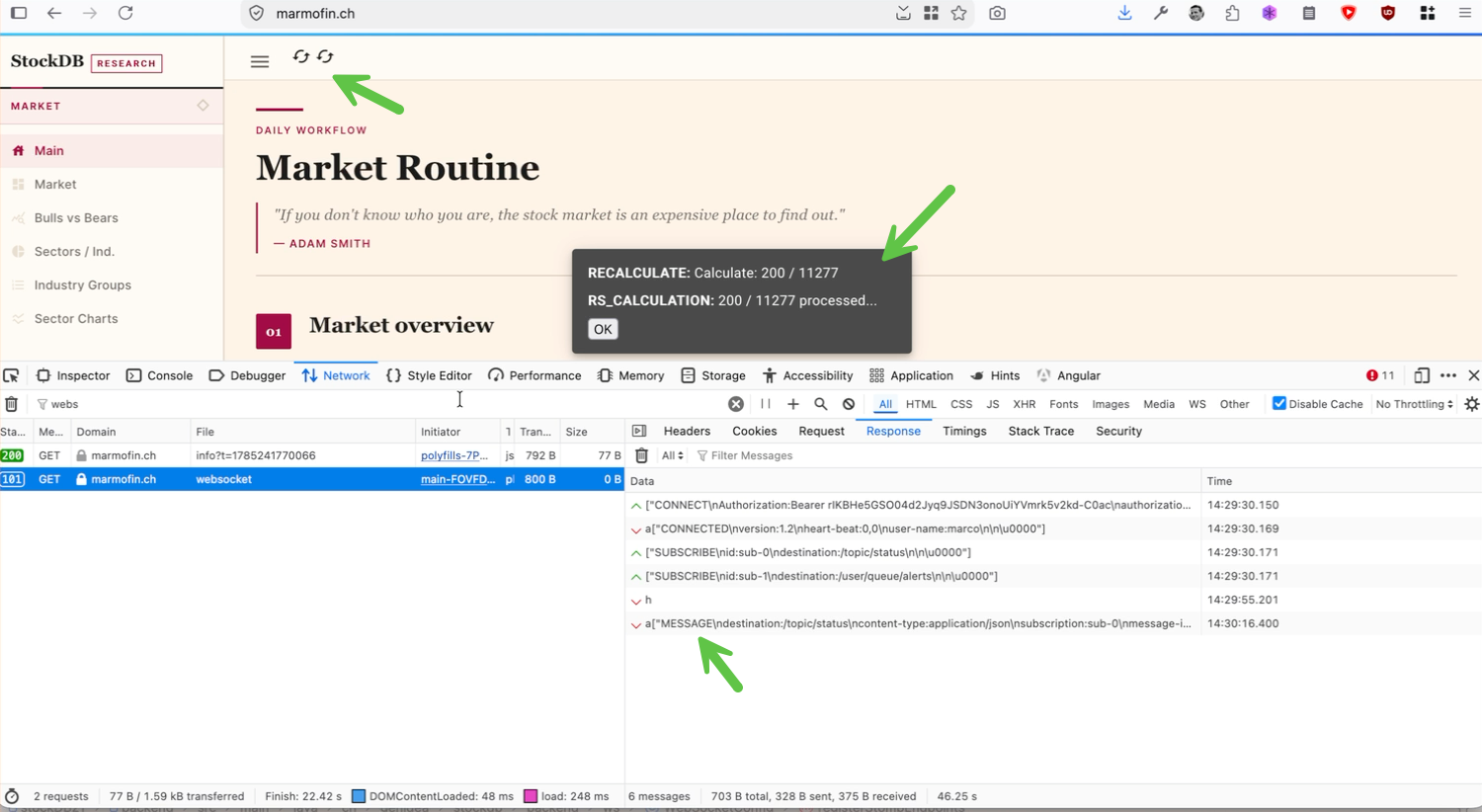
Polling could handle this, but most responses would contain the update: “Nothing new.”. In our use case polling using WebSockets is definitely a more adequate solution.
The following examples are simplified from the current MarMoFin implementation.
The use cases
The WebSocket integration handles two event families.
Shared processing status
The backend broadcasts progress for batches that can run on a predefined time or on user requests, e.g.:
- moving-average recalculation
- recalculation stages, including relative-strength processing
- market-data flat-file imports
- completed or failed operations
Angular displays these running events in a status icon in the menu area and a snackbar appears when the notification arrives.
Private stock alerts
The alert engine sends user-specific notifications for signals such as:
- price thresholds
- price and moving-average crosses
- unusual volume
- relative-strength line highs
- EPS acceleration
- earnings-beat streaks
The notification is delivered only to the authenticated rule owner when a specific rule trigger an alert.
Dependencies
Spring Boot requires the WebSocket starter:
<dependency>
  <groupId>org.springframework.boot</groupId>
  <artifactId>spring-boot-starter-websocket</artifactId>
</dependency>
The Angular application uses STOMP (Simple Text Oriented Message Protocol) and SockJS:
npm install @stomp/stompjs sockjs-client
npm install --save-dev @types/sockjs-client
The current application uses:
@stomp/stompjs 7.3
sockjs-client 1.6
Application flow
Spring Boot service
  -> SimpMessagingTemplate
  -> STOMP destination
  -> SockJS / WebSocket
  -> Angular WebSocketService
  -> RxJS state or notification
  -> Angular UI
Two destinations handle the application events:
/topic/status
/user/queue/alerts
/topic/status broadcasts activity updates to every subscriber, these notification are 'public' for all the users.
/user/queue/alerts delivers private alerts to the authenticated user.
Configure the allowed origins
A WebSocket connection starts as an HTTP request and includes the browser’s Origin header.
Using this configuration would allow every website to initiate a connection:
.setAllowedOriginPatterns("*")That is convenient during the first phase of development, for production we externalize the configuration in an immutable configuration record:
@ConfigurationProperties("app.websocket")
public record WebSocketProperties(
        List<String> allowedOrigins
) {
    public WebSocketProperties {
        if (allowedOrigins == null
                || allowedOrigins.isEmpty()) {
            throw new IllegalArgumentException(
                "At least one WebSocket origin must be configured"
            );
        }

        allowedOrigins = allowedOrigins.stream()
            .map(WebSocketProperties::validateOrigin)
            .toList();
    }
}
The implementation rejects:
- empty origin lists
- wildcard origins
- non-HTTP schemes
- URLs containing paths
- URLs containing query parameters or fragments
An origin must contain only its scheme, hostname and optional port:
http://localhost:4200
https://marmofin.ch
Configure the Spring message broker
Spring activates STOMP messaging with @EnableWebSocketMessageBroker:
@Configuration
@EnableWebSocketMessageBroker
@RequiredArgsConstructor
public class WebSocketConfig
        implements WebSocketMessageBrokerConfigurer {

    private final AuthTokenService authTokenService;
    private final AdminAccessService adminAccessService;

    @Override
    public void configureMessageBroker(
            MessageBrokerRegistry config
    ) {
        config.enableSimpleBroker("/topic", "/queue");
        config.setApplicationDestinationPrefixes("/app");
        config.setUserDestinationPrefix("/user");
    }

    @Override
    public void registerStompEndpoints(
            StompEndpointRegistry registry
    ) {
        registry.addEndpoint("/ws", "/api/ws")
            .setAllowedOrigins(
                webSocketProperties.allowedOrigins()
                    .toArray(String[]::new)
            )
            .withSockJS();
    }
}
The prefixes have different roles:
/app: messages sent from Angular to Spring message controllers/topic: broadcast destinations handled by the broker/queue: queue-style broker destinations/user: destinations resolved for an authenticated principal
Angular connects through:
/wsSockJS provides fallback transports when a native WebSocket connection cannot be established. If WebSockets are unavailable or blocked by a proxy, SockJS will emulate the connection using HTTP.
Development and production origins
The default configuration supports the Angular development server:
app.websocket.allowed-origins=${APP_WEBSOCKET_ALLOWED_ORIGINS:http://localhost:4200}Angular runs on port 4200 while Spring Boot runs on port 8080.
The browser therefore sends:
Origin: http://localhost:4200The production profiles use the public HTTPS origin:
app.websocket.allowed-origins=${APP_WEBSOCKET_ALLOWED_ORIGINS:https://marmofin.ch}Kubernetes overrides the value explicitly:
data:
  APP_WEBSOCKET_ALLOWED_ORIGINS: "https://marmofin.ch"
The same application code is used in both environments. Only the allowlist changes.
Authenticate the STOMP connection
MarMoFin uses an opaque Bearer session token (JWT will be introduced).
The backend generates a random token, stores its SHA-256 hash and associates it with an expiring user session.
With browser-based SockJS, custom authentication headers cannot be reliably added to the initial HTTP handshake. The token is therefore sent in the STOMP CONNECT frame.
Spring intercepts that frame:
@Override
public void configureClientInboundChannel(
        ChannelRegistration registration
) {
    registration.interceptors(new ChannelInterceptor() {
        @Override
        public Message<?> preSend(
                Message<?> message,
                MessageChannel channel
        ) {
            StompHeaderAccessor accessor =
                MessageHeaderAccessor.getAccessor(
                    message,
                    StompHeaderAccessor.class
                );

            if (accessor != null
                    && StompCommand.CONNECT.equals(
                        accessor.getCommand()
                    )) {
                resolveUsername(accessor)
                    .ifPresent(username ->
                        accessor.setUser(
                            authentication(username)
                        )
                    );
            }

            if (accessor != null
                    && StompCommand.SUBSCRIBE.equals(
                        accessor.getCommand()
                    )
                    && isUserDestination(
                        accessor.getDestination()
                    )
                    && accessor.getUser() == null) {
                throw new AccessDeniedException(
                    "Authenticated WebSocket user is required"
                );
            }

            return message;
        }
    });
}
During CONNECT, the backend:
- reads the Bearer token
- resolves the active session
- retrieves the username
- creates the WebSocket principal
Subscriptions to /user/... are rejected when no authenticated principal is available.
For a larger messaging API, authorization should also validate every protected SEND and SUBSCRIBE destination.
Broadcast background progress
The status service keeps the active operations in a concurrent map:
@Service
@RequiredArgsConstructor
public class StatusService {

    private final SimpMessagingTemplate messagingTemplate;

    private final Map<Activity, ActivityStatus> openStatuses =
        new ConcurrentHashMap<>();

    public void updateStatus(
            Activity activity,
            String message
    ) {
        openStatuses.put(
            activity,
            new ActivityStatus(activity, message)
        );

        broadcast();
    }

    public void closeStatus(Activity activity) {
        openStatuses.remove(activity);
        broadcast();
    }

    private void broadcast() {
        messagingTemplate.convertAndSend(
            "/topic/status",
            openStatuses.values()
        );
    }
}
A calculation publishes its initial state:
statusService.updateStatus(
    Activity.RECALCULATE,
    "Starting MA recalculation..."
);
It can update the same activity while processing:
statusService.updateStatus(
    Activity.RECALCULATE,
    String.format(
        "Calculate: %d / %d",
        current,
        total
    )
);
When the operation finishes:
statusService.closeStatus(
    Activity.RECALCULATE
);
The flat-file importer uses the same mechanism:
Importing flat files:
18 / 252 days checked,
4,821,503 rows saved,
2 missing
This gives the user more information than an indeterminate spinner running long enough to become part of the page design.
Send a private stock alert
When a stock rule is triggered, the alert engine stores the event and sends a notification to the rule owner:
private void publishNotification(AlertEvent event) {
    if (event.getUsername() == null
            || event.getUsername().isBlank()) {
        return;
    }

    messagingTemplate.convertAndSendToUser(
        event.getUsername(),
        "/queue/alerts",
        new AlertNotificationMessage(
            event.getId(),
            event.getRule().getId(),
            event.getUsername(),
            event.getTicker(),
            event.getRuleType(),
            event.getTriggerDate(),
            event.getObservedValue(),
            event.getThreshold(),
            event.getMessage(),
            event.getCreatedAt()
        )
    );
}
Angular subscribes to:
/user/queue/alertsSpring resolves this logical destination using the authenticated principal.
Configure the Angular STOMP client
The Angular service creates a STOMP client backed by SockJS:
@Injectable({
  providedIn: 'root'
})
export class WebSocketService {
  private readonly statusSubject =
    new BehaviorSubject<ActivityStatus[]>([]);

  readonly status$ =
    this.statusSubject.asObservable();

  private readonly stompClient: Client;

  constructor(
    private readonly snackBar: MatSnackBar,
    private readonly notificationService:
      NotificationService,
    private readonly authService: AuthService
  ) {
    const endpoint =
      window.location.hostname === 'localhost'
        ? 'http://localhost:8080/gs-guide-websocket'
        : `${window.location.origin}/gs-guide-websocket`;

    this.stompClient = new Client({
      webSocketFactory: () => new SockJS(endpoint),
      reconnectDelay: 5000,
      heartbeatIncoming: 4000,
      heartbeatOutgoing: 4000,

      beforeConnect: async () => {
        const token = this.authService.getToken();

        this.stompClient.connectHeaders = token
          ? {
              Authorization: `Bearer ${token}`,
              authorization: `Bearer ${token}`
            }
          : {};
      }
    });

    this.configureSubscriptions();
  }
}
The client configuration provides:
- automatic reconnection after five seconds
- incoming and outgoing heartbeats
- the current session token before each connection attempt
- separate local and production endpoints
Reading the token in beforeConnect is important because a reconnection can happen long after the Angular service was created.
Subscribe after connecting
Subscriptions are registered in onConnect:
private configureSubscriptions(): void {
  this.stompClient.onConnect = () => {
    this.stompClient.subscribe(
      '/topic/status',
      message => {
        const activities =
          JSON.parse(message.body)
            as ActivityStatus[];

        this.statusSubject.next(activities);

        if (activities.length > 0) {
          this.snackBar.openFromComponent(
            SnackbarComponent,
            { duration: 5000 }
          );
        }
      }
    );

    this.stompClient.subscribe(
      '/user/queue/alerts',
      message => {
        this.handleAlertNotification(message);
      }
    );
  };

  this.stompClient.onStompError = frame => {
    console.error(
      'WebSocket broker error:',
      frame.headers['message']
    );
  };
}
Subscriptions belong inside onConnect because reconnecting creates a new STOMP session.
The client must subscribe again after the connection is restored.
Convert messages into Angular state
Components do not need to know about STOMP frames.
The service converts status messages into an RxJS observable:
private readonly statusSubject =
  new BehaviorSubject<ActivityStatus[]>([]);

readonly status$ =
  this.statusSubject.asObservable();
A component can consume that state directly:
@if (status$ | async; as activities) {
  @for (activity of activities; track activity.activity) {
    <div>
      <strong>{{ activity.activity }}</strong>
      {{ activity.activityStatus }}
    </div>
  }
}
The boundary stays simple:
STOMP message
  -> WebSocketService
  -> typed application state
  -> Angular component
Display private alerts
The private alert is converted into an application notification:
private handleAlertNotification(
  message: Message
): void {
  try {
    const alert =
      JSON.parse(message.body)
        as AlertNotificationMessage;

    this.notificationService.warn(
      alert.message ||
      `${alert.ticker} alert triggered`
    );
  } catch (error) {
    console.error(
      'Error parsing alert notification:',
      error
    );
  }
}
The REST API still provides stored alert history.
WebSockets deliver the new event immediately:
REST
  -> current and historical state

WebSocket
  -> new events
A WebSocket transports events. It does not replace persistence.
Follow the authentication lifecycle
The application connects after login and disconnects after logout:
this.auth.isLoggedInObservable()
  .subscribe(loggedIn => {
    if (loggedIn) {
      this.webSocketService.connect();
    } else {
      this.webSocketService.disconnect();
    }
  });
The service prevents anonymous and duplicate connections:
connect(): void {
  if (this.stompClient.active) {
    return;
  }

  if (!this.authService.getToken()) {
    return;
  }

  this.stompClient.activate();
}

disconnect(): void {
  if (!this.stompClient.active) {
    return;
  }

  void this.stompClient.deactivate();
}
Kubernetes configuration
Kubernetes must route /ws to Spring Boot rather than the Angular frontend:
- path: /ws
  pathType: Prefix
  backend:
    service:
      name: backend
      port:
        number: 8080
pathType: Prefix is important because SockJS creates additional URLs below /ws for information and transport requests.
The Nginx ingress keeps the connection open with longer timeouts:
metadata:
  annotations:
    nginx.ingress.kubernetes.io/proxy-http-version: "1.1"
    nginx.ingress.kubernetes.io/proxy-connect-timeout: "60"
    nginx.ingress.kubernetes.io/proxy-read-timeout: "3600"
    nginx.ingress.kubernetes.io/proxy-send-timeout: "3600"
The public origin is supplied to Spring Boot through the backend ConfigMap:
data:
  APP_WEBSOCKET_ALLOWED_ORIGINS: "https://marmofin.ch"
The ingress does not add a second wildcard CORS policy.
Production is same-origin:
Angular:    https://marmofin.ch
REST:       https://marmofin.ch/api
WebSocket:  https://marmofin.ch/ws
Spring Boot remains responsible for validating the WebSocket origin.
MarMoFin also serves Angular routes through a fallback controller. The ws path must be excluded from that fallback:
private static final String FIRST =
    "(?!api$|ws$)[\\w-]+";
Without the exclusion, the Angular fallback can handle the SockJS request before the WebSocket handler receives it.
The endpoint exists, the backend is healthy, the client keeps reconnecting—and the request is enjoying index.html.
Limitations
The application currently uses Spring’s simple in-memory broker. For a more complex configuration with multiple instances an MQ server with a STOMP broker relay are recommended.