JavaScript: copy array. Deep and Shallow clone copy explained.
This seems like a simple problem to solve. When working on a project, you may often need to duplicate an array.
This issue occurs more frequently when using a reactive state manager that works with immutable objects.
In general, it's important to determine whether we need a shallow or deep copy of an array.
Shallow vs. Deep Copy
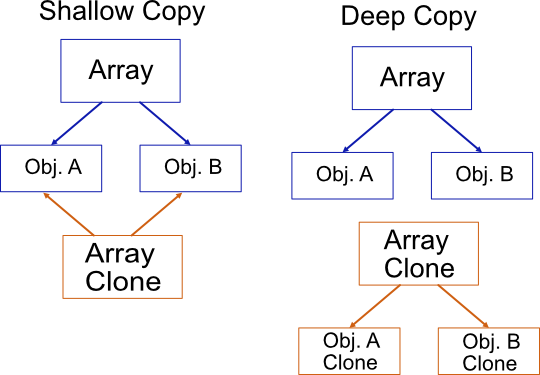
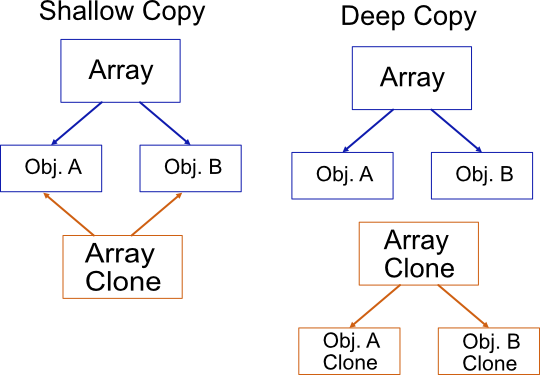
loading="lazy" alt="example of differences between shallow and deep copy in javascript" width="540" height="375" />
Shallow Copy
A shallow copy creates a new array object, but the original elements inside the array are still referenced.
Deep Copy
A deep copy clones the original array and its contents, ensuring that all elements are independent copies.
When to Use Each Approach?
- Shallow Copy: Useful for temporary modifications where changes should reflect in the original array.
- Deep Copy: Essential when you need independent copies that won’t affect the original array.
Shallow Copy
A shallow copy simply creates a new array with the same references to objects from the original array.
loading="lazy" src="/assets/img/uploads/2020/jsshallowcopy.webp" alt="javascript shallow copy" width="505" height="195"/>
If you modify an object inside the cloned array, the original object will be updated as well.
How to Create a Shallow Copy in JavaScript
Here are some common ways to create a shallow copy:
// Spread operator
const newArraySpread = [...originalArray];

// Slice method
const newArraySlice = originalArray.slice();

// Array.from
const newArrayFrom = Array.from(originalArray);
📌 Performance Note: According to some benchmarks, slice is often the fastest method. You can test different methods with this online benchmark: https://jsben.ch/lO6C5.
Deep Copy
A deep copy clones the original array and all its contents to new objects.
There are no references to the original array, meaning modifications will not affect the original data.
loading="lazy" src="/assets/img/uploads/2020/jsdeepcopy.webp" alt="javascript deep copy" height="242" width="299" />
How to Create a Deep Copy in JavaScript or TypeScript
1. Using JSON Methods
The simplest method in JavaScript is to convert the array to a JSON string and parse it back:
const newArray = JSON.parse(JSON.stringify(originalArray));⚠️ Limitations:
- Cannot handle circular references.
- Loses functions and special objects like
DateandMap. - Not efficient for large arrays due to performance costs.
2. Using Lodash (Recommended for Complex Objects)
Many developers prefer external libraries like Lodash, which provides a robust deep copy function:
import _ from "lodash";

const originalArray = [{ language: "JavaScript" }, { language: "TypeScript" }];

const clonedArray = _.cloneDeep(originalArray);
✅ Lodash ensures that all objects inside the array are fully cloned without reference issues.
Final Thoughts
- Use a shallow copy when you need a quick duplicate while maintaining object references.
- Use a deep copy when you require full data independence.
- Choose the right method based on your needs and performance considerations.