Angular 22.3 - What is new
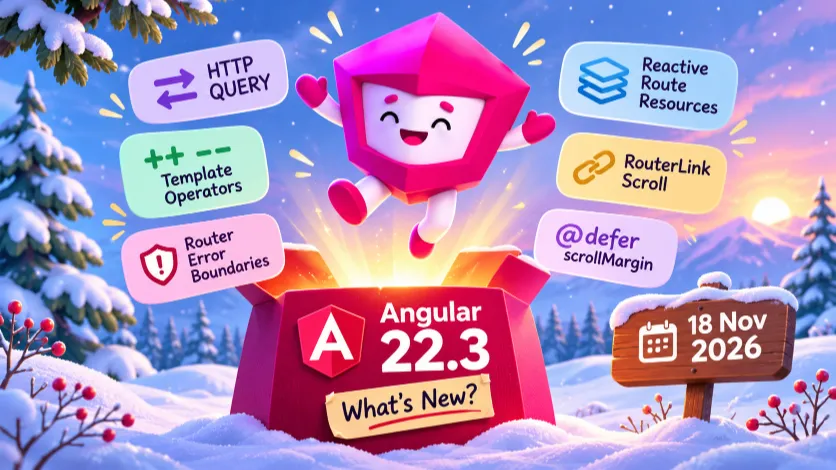
Angular 22.3 is officially released on November 18, 2026.
This is a release with a lot of bug fixes, compiler improvements and several interesting new features.
Don't expect revolutionary changes in your daily coding or code reviewing routine. However, if you are working with the Angular Router, there are some features you should definitely know about.
Here we look at the changes that could somehow impact our daily development.
To see the changes in the previous versions you can read the posts:
 Marco Molteni
 Marco Molteni

Support for HTTP QUERY requests
Angular 22.3 introduces a new method in the HttpClient: query().
You can get more information about the new HTTP method here:
 Marco Molteni

With QUERY, we have an HTTP method that supports a request body while being safe and idempotent.
const http = inject(HttpClient);

const products$ = http.query<Product[]>(
  '/api/products',
  {
    category: 'electronics',
    minPrice: 100,
    maxPrice: 500,
    inStock: true
  }
);
HTTP transfer cache for QUERY
Another interesting aspect is caching.
When using SSR and hydration, Angular caches GET and HEAD requests on the server and reuses their responses on the client.
Starting with Angular 22.3, QUERY requests are also eligible for the HTTP transfer cache by default.
Of course, your backend and infrastructure must also support the QUERY method (Spring Boot is coming with this new feature).
Increment and decrement operators in templates
You can now use ++ and -- directly in your Angular templates.
@Component({
  selector: 'app-counter',
  template: `
    <button (click)="count--">-</button>
    <span>{{ count }}</span>
    <button (click)="count++">+</button>
  `
})
export class CounterComponent {
  count = 0;
}
Both prefix and postfix operators are supported.
<button (click)="++count">Increment</button>
<button (click)="--count">Decrement</button>
The goal is to align Angular's template expression syntax more closely with native JavaScript.
I don't think I've ever really needed this feature, but as a developer, I would naturally expect these operators to work.
If you are using signals, you should continue using the update() method.
export class CounterComponent {
  count = signal(0);

  increment(): void {
    this.count.update(value => value + 1);
  }

  decrement(): void {
    this.count.update(value => value - 1);
  }
}
New Builder library
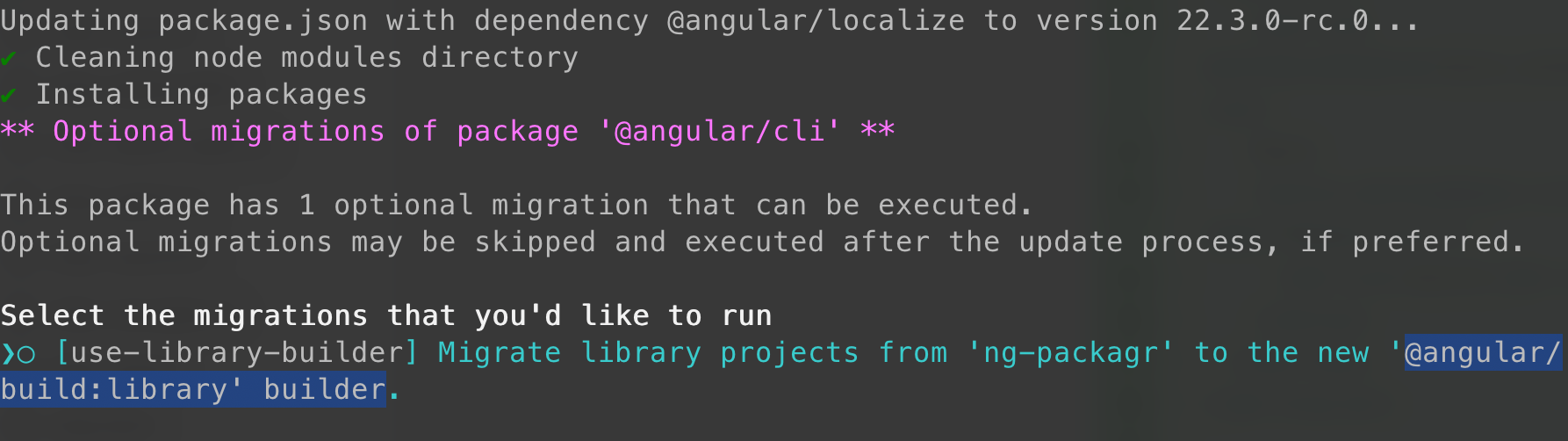
Angular 22.3 introduced a new builder library @angular/build:library for compiling and packaging Angular libraries, it replaces ng-packagr.
The new builder should:
- improve the performances
- better incremental builds (20-22% faster)
- better integration with Angular tooling
When you update the project CLI will ask you if you want to switch to the new builder.
A new scroll input for RouterLink
This is a small but very useful improvement for the navigation if you use tabs or filters.
During the navigation you can use query parameters to store the currently selected tab.
When scroll restoration is enabled, navigating to another tab can cause the page to scroll back to the top. With the scroll directive you can opt-out the default behavior.
With Angular 22.3, you can prevent this directly in your RouterLink.
<a
  routerLink="/products/42"
  [queryParams]="{ tab: 'reviews' }"
  scroll="manual">
  Reviews
</a>
The same option is available for programmatic navigation.
router.navigateByUrl(
  '/products/42?tab=reviews',
  { scroll: 'manual' }
);
New scrollMargin option for @defer
Angular adds support for the scrollMargin option when using viewport triggers in @defer blocks.
@defer (on viewport({ scrollMargin: '200px' })) {
  <app-product-list />
} @placeholder {
  <p>Loading products...</p>
}
It allows us to adjust the intersection boundaries of scrollable containers so that deferred content can start loading before it becomes visible.
Features in Developer Preview
Development Preview in Angular means that these features are available in the distribution, but they could get some changes before the 'final' release.
Router error boundaries
Angular introduces the possibility of defining an error component directly in your route configuration.
This can be useful if you want to handle an error that is triggered while creating or rendering the component.
Instead of leaving the user with a broken page, you can define a fallback component.
const routes: Routes = [
  {
    path: 'products/:id',
    component: ProductComponent,
    errorComponent: ProductErrorComponent
  }
];
To enable this feature, you need to configure the Router with withErrorBoundaries().
provideRouter(
  routes,
  withErrorBoundaries()
)
You can also configure a default error component for your application.
provideRouter(
  routes,
  withErrorBoundaries({
    defaultErrorComponent: GlobalErrorComponent
  })
)
The error component can receive the error through an input.
@Component({
  selector: 'app-product-error',
  template: `
    <h2>Something went wrong</h2>
    <p>We could not display this product.</p>
  `
})
export class ProductErrorComponent {
  error = input.required<unknown>();
}
Improvements to route resources
Route resources were introduced in Angular 22.2 as a reactive alternative to traditional route data resolvers.
Angular 22.3 brings several improvements:
- Route parameters, query parameters, fragments and route data are exposed as signals.
- Resources across matched routes can load concurrently.
- Child routes can access resources from their parent routes.
- Resources can depend on other resources.
- Lazy-loaded components and route resources can load concurrently.
Here is an example of a resource using reactive route parameters:
const routes: Routes = [
  {
    path: 'products/:id',
    component: ProductComponent,
    resources: (ctx) => ({
      product: resource({
        params: () => ctx.params()['id'],
        loader: ({ params: id }) => fetchProduct(id)
      })
    })
  }
];
If the parent and child have independent information they can load them concurrently. This could save some waiting time to your frontend.